
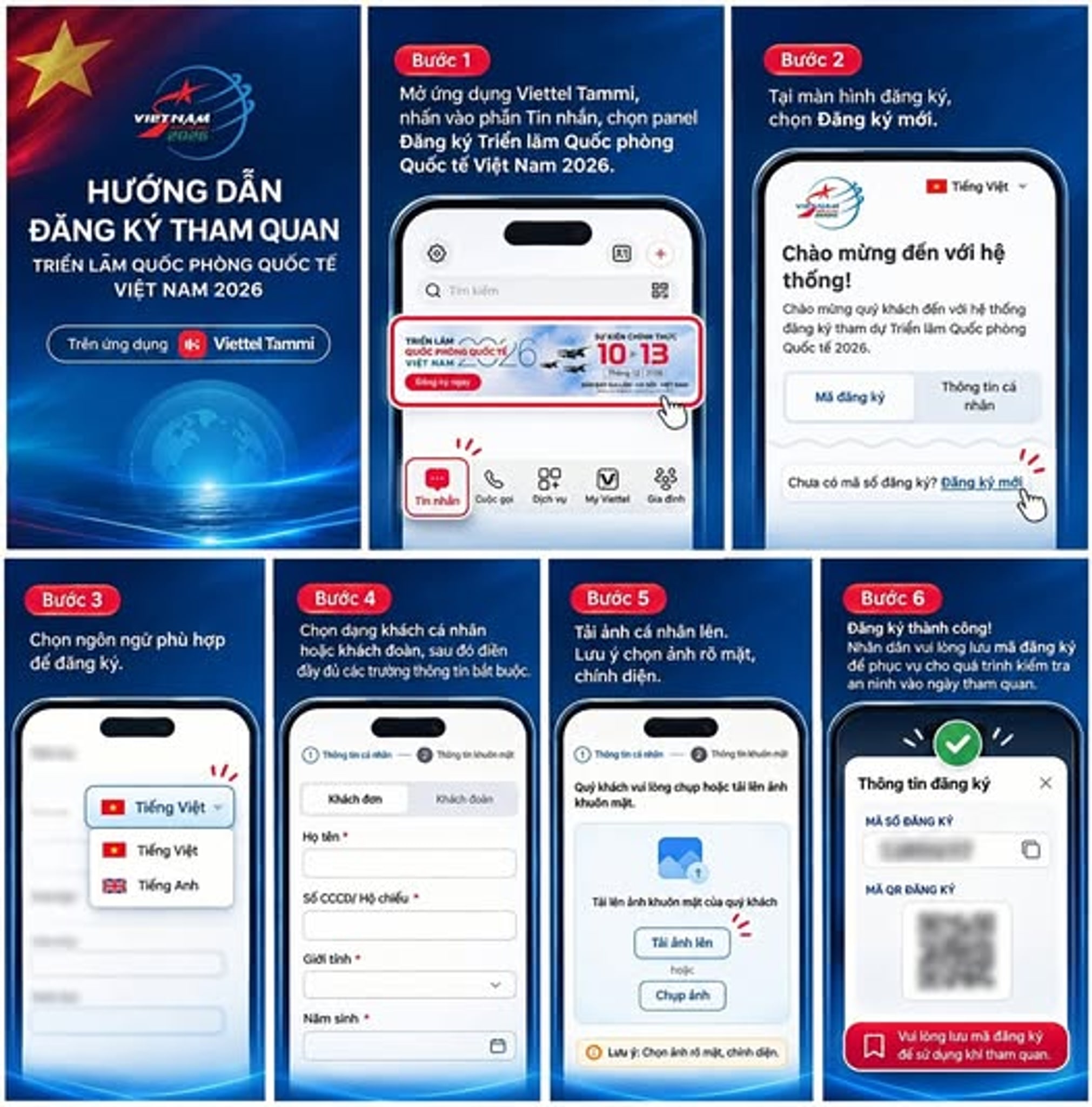
Registering for the Vietnam International Defence Expo 2026 is super easy. You can do it either via the Viettel Tammi app or directly on the official organiser's website. Just follow these 6 simple steps to fill in your details and upload your photo to get your QR code for security clearance.
Quick Summary:
- Register quickly using the Viettel Tammi app or the official Ministry of National Defence registration website.
- The process involves 6 clear steps, from selecting your language to entering personal details and uploading a clear portrait.
- Make sure to save your registration code and QR code, as you'll need these to clear security at the entrance.
If you're planning to visit this massive military event in 2026, getting your registration sorted early will save you a lot of time queuing at the gates. To help you avoid any hassle, we've put together a step-by-step guide so you can easily complete the process on your phone or computer.
1. Choose Your Registration Method
The organisers have set up two official channels for visitors. You can choose whichever one suits you best:
- Method 1 (App): Open the Viettel Tammi app on your phone, go to "Messages," and tap on the Vietnam International Defence Expo 2026 banner.
- Method 2 (Website): Visit the official portal directly at https://exporegistration.mod.gov.vn/authentication%5Fv2 via your web browser.
2. The 6-Step Registration Process
Once you're on the registration page, just follow these steps to avoid any issues:
- Access the system: Use either method mentioned above to get to the registration homepage.
- Select 'New Registration': Click this to start creating your visitor profile.
- Choose Language: The system supports both Vietnamese and English, so just pick the one you're comfortable with.
- Enter details: Choose whether you are an 'Individual' or 'Group' visitor, then fill in all the required personal information accurately.
- Upload portrait: Have a clear, front-facing portrait photo ready and upload it for identity verification purposes.
- Complete registration: Double-check your info and make sure to save your registration code and QR code once the system confirms your application is successful.
Important Note on Keeping Your QR Code
It sounds simple, but keeping your QR code safe is crucial. When you arrive at the venue, security personnel will need to verify your details using this code. It’s highly recommended to take a screenshot or save the image file to your device so you can show it easily, even if there's no internet connection in the crowded area.
Get Ready for the Expo
We hope this guide helps you register for the Vietnam International Defence Expo 2026 without any hiccups. If you run into any trouble or have any questions during the process, feel free to drop a comment below and we'll do our best to help you out!
Reference: https://blog.dulichdau.com/huong-dan-dang-ky-trien-lam-quoc-phong-2026/
