
GUIDELINES FOR LOOKING UP EXIT BAN INFORMATION
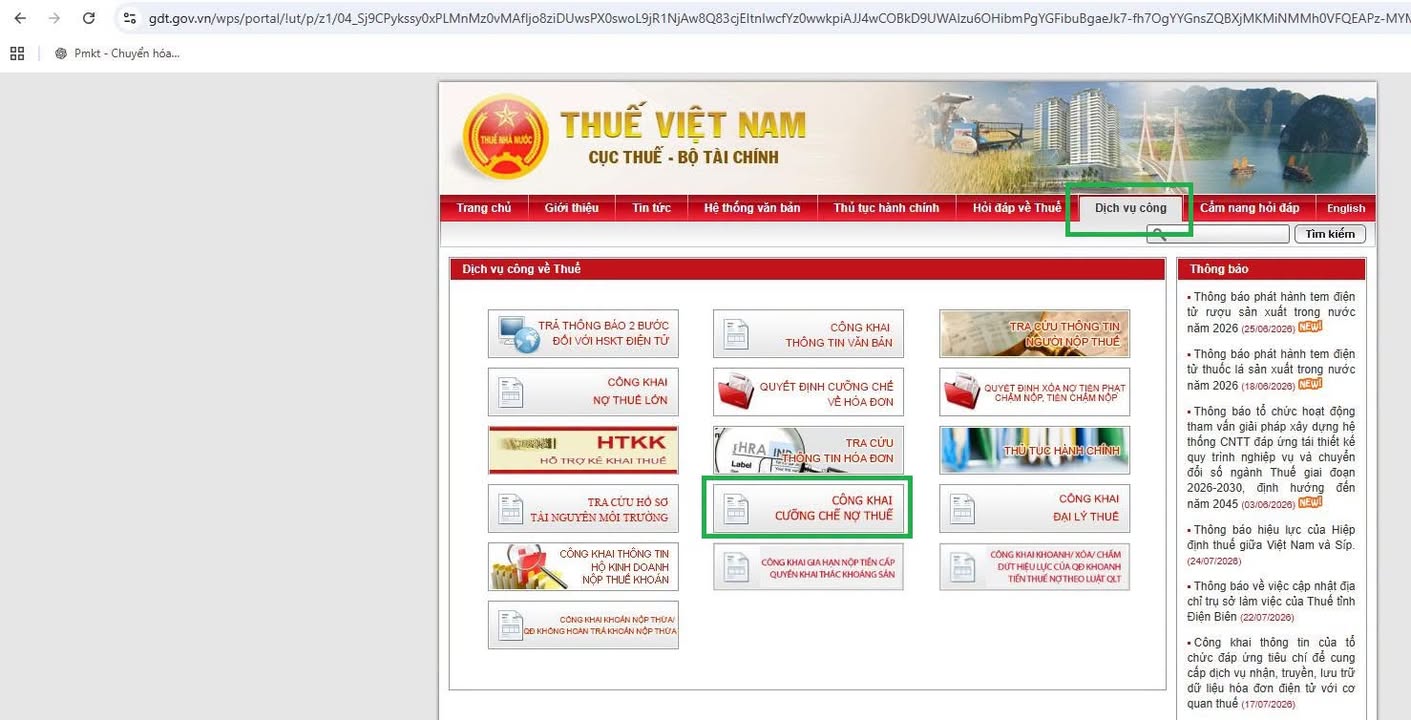
1- Visit the General Department of Taxation's website at gdt.gov.vn
2- Select Public services ---> Select Public disclosure of tax debt enforcement
3- Select the section for taxpayers with notices of temporary exit suspension
4- Enter the individual's ID card number into the Document number field, enter the captcha code ---> click search.
Information about the household business/individual business/company you represent that has tax debts will appear. Review the information, contact the tax officer whose phone number is listed on the notice to complete the procedures for paying all remaining tax debts.
30 days after the tax authority issues a notice of temporary exit suspension if the taxpayer fails to fulfill their tax obligations, the tax authority will issue an exit ban notice.
In addition to looking up on the tax authority's website, you can access etax mobile, select "Notice lookup", and check under "Tax authority's administrative notices" and "Other notices"
If subject to a temporary exit suspension, the application will display a notice regarding the temporary exit suspension due to tax debt
